Save time managing groups by allowing users to join themselves. If you need more control over who can join, you can make a group private instead.
What's the difference?
- Joinable: Users can see the group and join it themselves, so you don't need to add them individually or in bulk.
- Private: Users cannot join the group themselves as the groups are not visible. You control who is added to the group.
On the Groups page in Engage settings, joinable groups have a green JOINABLE tag, making them easy to distinguish from private groups.
On the Groups page (in the settings section of Engage), joinable groups will appear with a green tag saying ‘joinable’ so you can distinguish between groups that users can join versus those that cannot be joined (private).

To set a group as joinable or private:
- After logging in to Engage, navigate to the settings section by clicking the cog icon in the top right-hand corner of your screen.

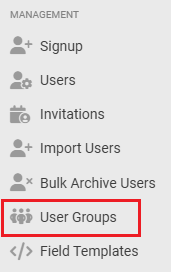
- On the left-hand side of your screen, navigate to 'User Groups'
.
- Create a new group or click on the name of an existing group that you would like to edit then select the ‘Edit’ button at the top of the next page.

- Using the drop-down menu, select ‘Yes’ under ‘Joinable’ to set your group as joinable, or 'No' to set the group as private.
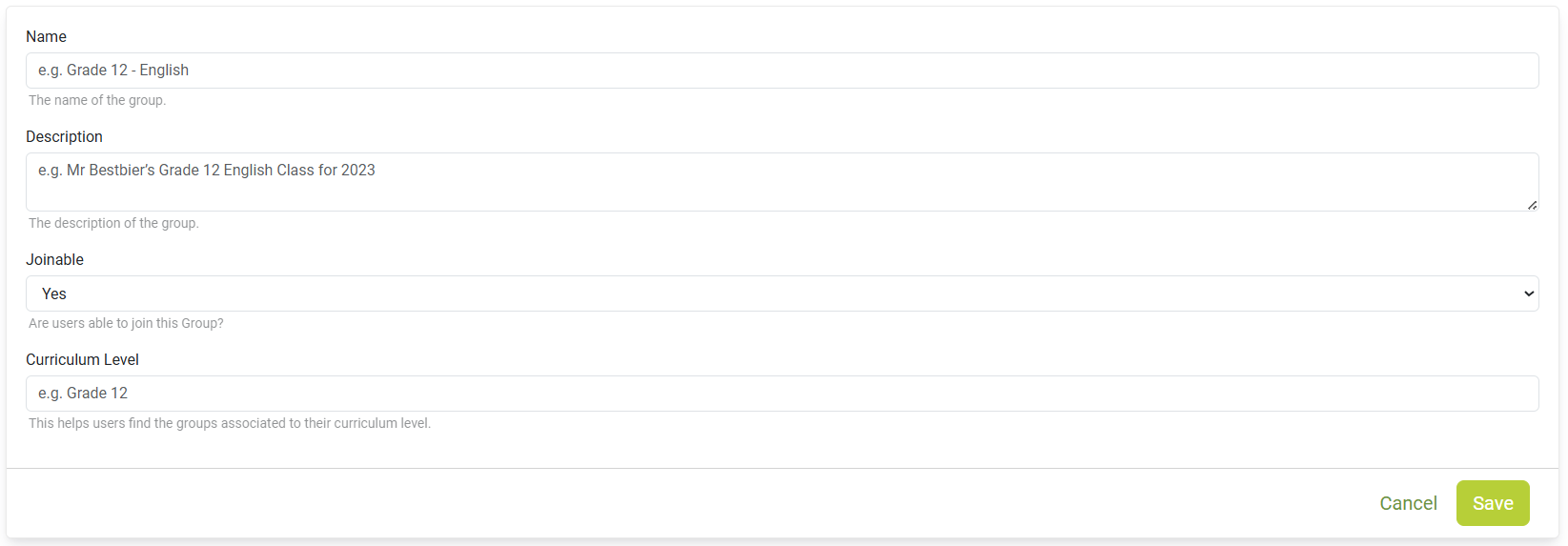
- Click ‘Save’.
What happens next?
- Joinable groups are visible to other users on the Engage Home page, where they can join the group themselves.
- If you change a joinable group to private, it will no longer appear on the Home page and new users will not be able to join themselves.
- Users who are already members of the group will remain in the group.
- Joinable groups will be visible to other users on the Home page in Engage, where they will easily be able to join.
- If you change a previously joinable group to private (using the steps above), the group will subsequently be removed from the Home page in Engage and users will not be able to add themselves to that group. Existing users will remain in the group.
Need help? Use the live chat in the bottom right corner of your screen, email us at help@snapplify.com or reach out via Whatsapp +27 60 011 8065.


